Harnessing Kubernetes CronJobs and RBAC in Service of Energy Savings
I think I might have just invented the most ridiculous way to turn off a lightbulb — using not one, not two, but three Kubernetes Cronjobs! How did I do it, you ask? I will tell you all about it in a moment, but first, I should start by telling you why. Part of what we will explore will involve talking about container and Kubernetes concepts and I’ll assume you have some basic familiarity. I’ll also explain the bits that really matter as we go. You can view the entire source code at this link, if you would like to.
Two of the exterior light fixtures outside my home are fitted with Phillips Hue bulbs. They are connected to a Hue Bridge which allows them to be controlled with the Hue mobile app. This is all well and good, but I sometimes forget to turn them off during the day, wasting energy and racking up my electricity bill. I reckoned I needed to do something about this. The easiest, and perhaps rational thing to do, would have been to create an automation using the Hue mobile app, but where’s the fun in that?
Under the hood, the Hue mobile app controls the lights by making http API calls to a web server running on the Hue Bridge. The Bridge then communicates with the lights by Zigbee protocol. Surely, I could write a program to make the necessary API calls and automate things the fun way. Before we go any further, there’s something I should confess to you. You see, I am the kind of guy that runs a homelab Kubernetes cluster; the sort of person that sees Kubernetes lurking behind every problem. I immediately “pictured” a containerized application that would be deployed to a Kubernetes cluster. Deployed as what and how though?
Well, perhaps I could make it long running as a Pod of a Kubernetes deployment. The application would fetch the forecast sunrise and sunset times at a fixed time early in the day, and then go to sleep until it needed to take an action to either turn the light off at sunrise or back on at sunset. Now, I have done my fair share of sleep loops to “just get things working,” but there’s something that never quite feels right about it. I thus set myself a bonus challenge to try to implement a solution devoid of sleep!
Frankenstein Delight
After some brainstorming with my colleagues Nick and James, I settled on the following architecture:
- Decouple the orchestration of the on/off actions from the actual actions using Kubernetes CronJobs.
- Scheduler Cronjob: run daily at a fixed time. Makes a http request to the openweathermap API to get the weather forecast for the day, parse out the sunrise and sunset times from the response, then modify the execution time of the other two CronJobs as per the forecast
- Sunrise CronJob (single responsibility): turns light off at sunrise by communicating with the Hue Bridge
- Sunset CronJob (single responsibility): turns light on at sunset
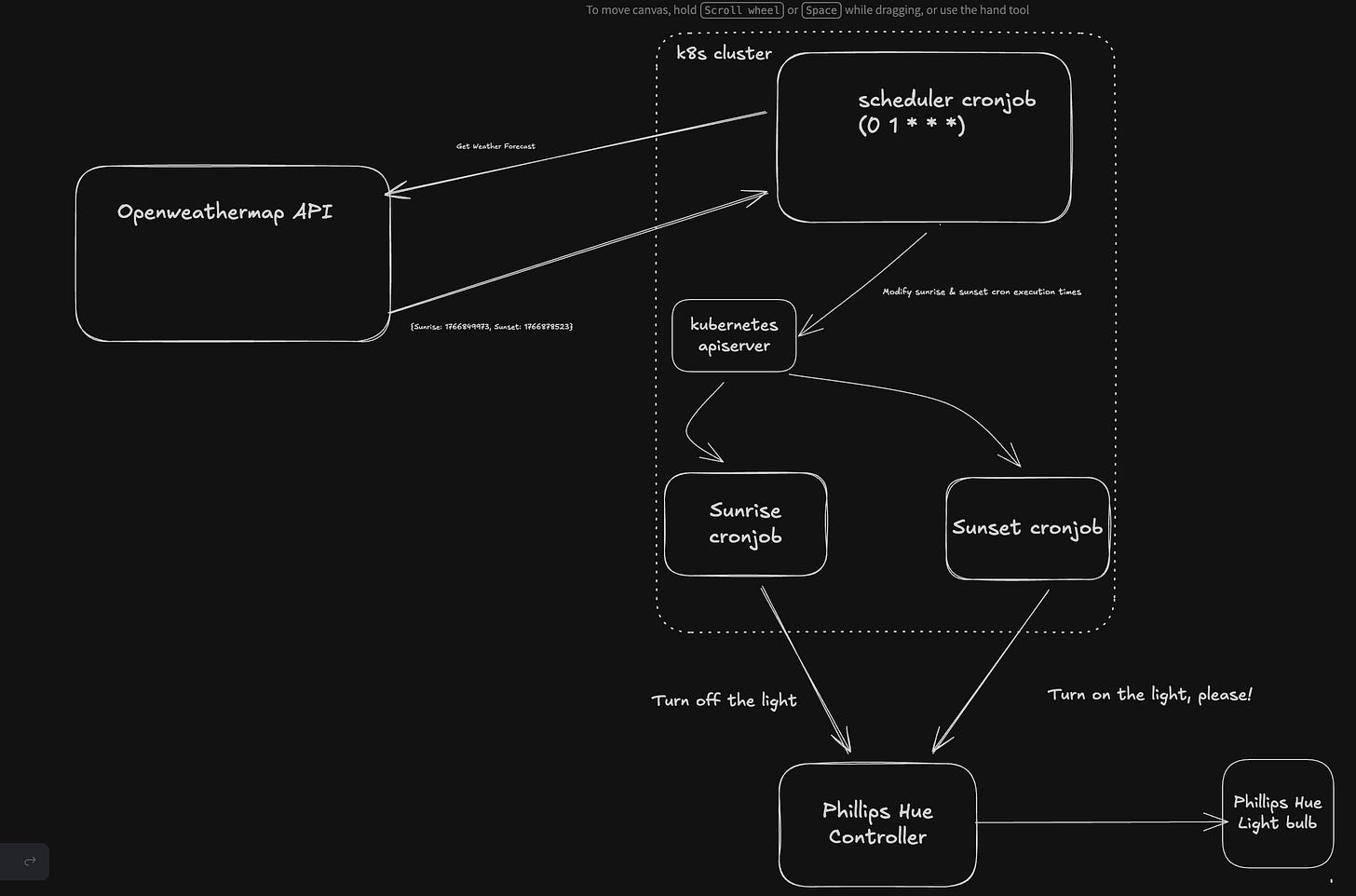
Naturally, all of this monstrosity would be written in Go! But what are Kubernetes Cronjobs in the first place? Why might they even be a workable solution to the problem at hand?
What’s Your Job, Mr Cron?
Like its Unix equivalent, a Kubernetes CronJob is intended for performing regular scheduled actions, such as performing a backup, generating a report, etc. It is like one line of a crontab file on a Unix system. A Kubernetes CronJob will run a job periodically on a given schedule written in Cron format. This certainly sounded like a way to avoid using a long running process with sleep loops!
The snippet below shows part of the YAML manifest for the Scheduler CronJob. It is scheduled to run at 2 AM Mountain Time or 9 AM UTC (line 41). The image in the containers section of the spec (line 57) is a reference to an image hosted in my homelab private container registry. When the job runs, it creates a container (process) using the image’s entrypoint and any arguments passed to it.
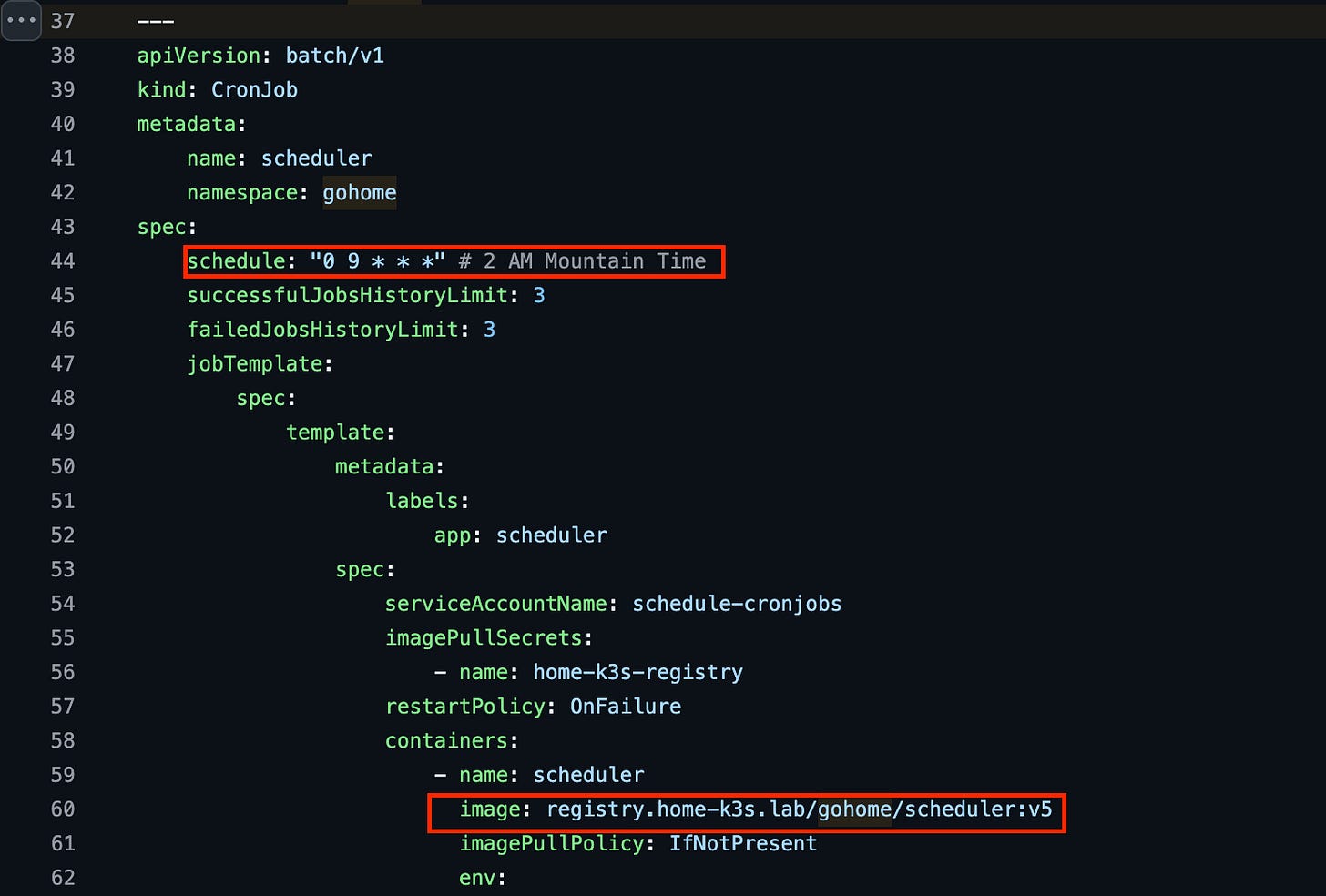
YAML manifest for the Scheduler CronJob
Similarly, Sunrise and Sunset are configured with default execution times and based on their own container images. However, each successful execution of the Scheduler CronJob modifies the execution time of the Sunrise and Sunset jobs according to the day’s weather forecast.
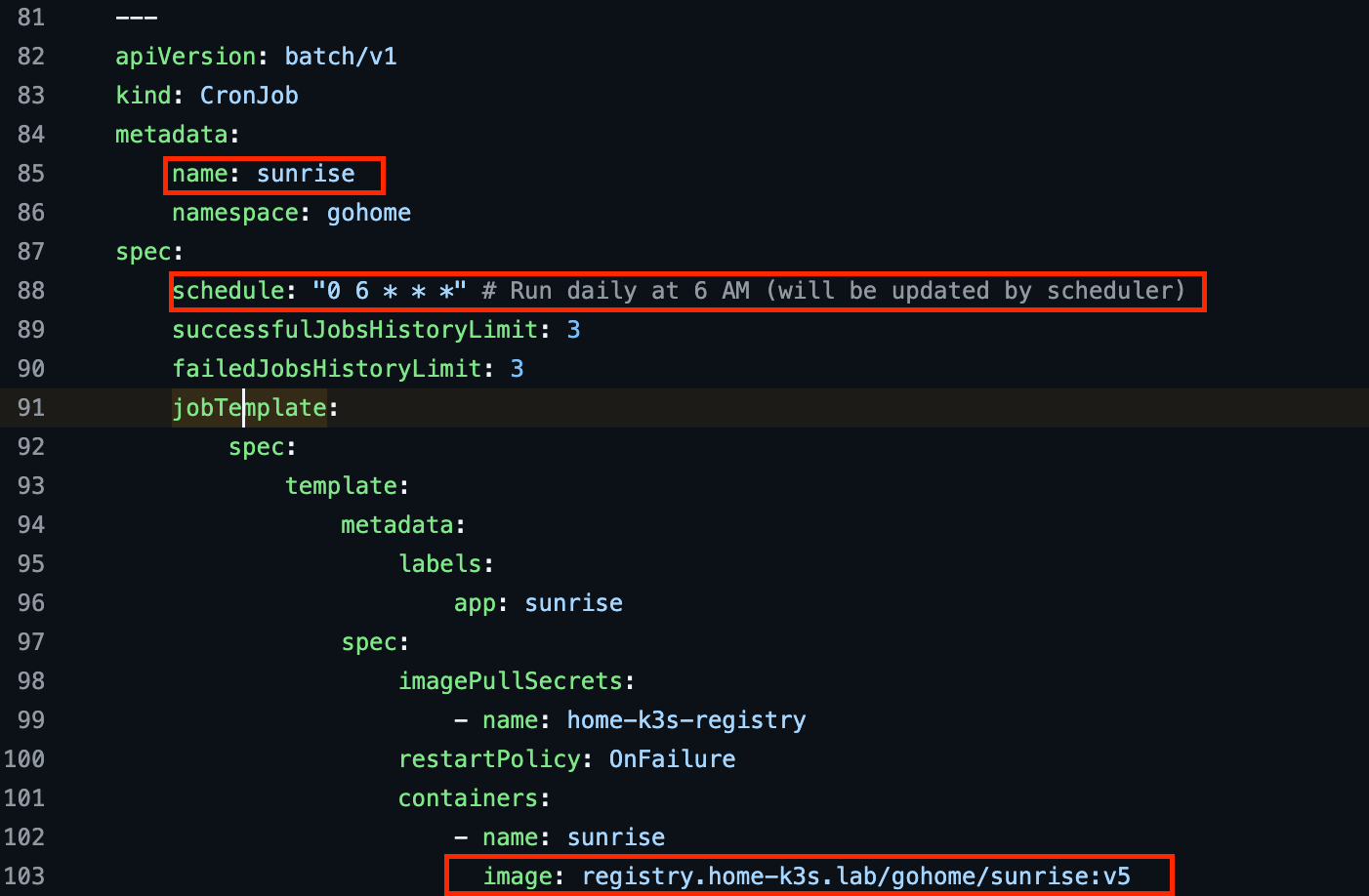
YAML manifest for the Sunrise CronJob
How come the Scheduler Cronjob has the ability to modify the execution schedule of the other cronjob? It sounds rather insecure for one resource to be able to “mutate” another in this way without being specifically configured to be able to do so.
RBAC At Ya!
So, here’s the challenge. We want to enable one CronJob to be able to modify the execution time of another. Surely, this kind of permission should not be default for any secure system and thankfully it isn’t with Kubernetes. The recommended approach for granting permissions to applications is with the use of Role-Based Access Control (RBAC). Well then, how do we implement RBAC for the scheduler Cronjob so it can do it’s job?
The first step is to assign a Service Account to the Job’s container. This service account gives it a unique identity. The snippet below shows part of the manifest for the schedule-cronjobs service account.

YAML manifest for the service account
In the manifest for the CronJob, we specify that it should use this service account by assigning to the spec.serviceAccountName (line 54).
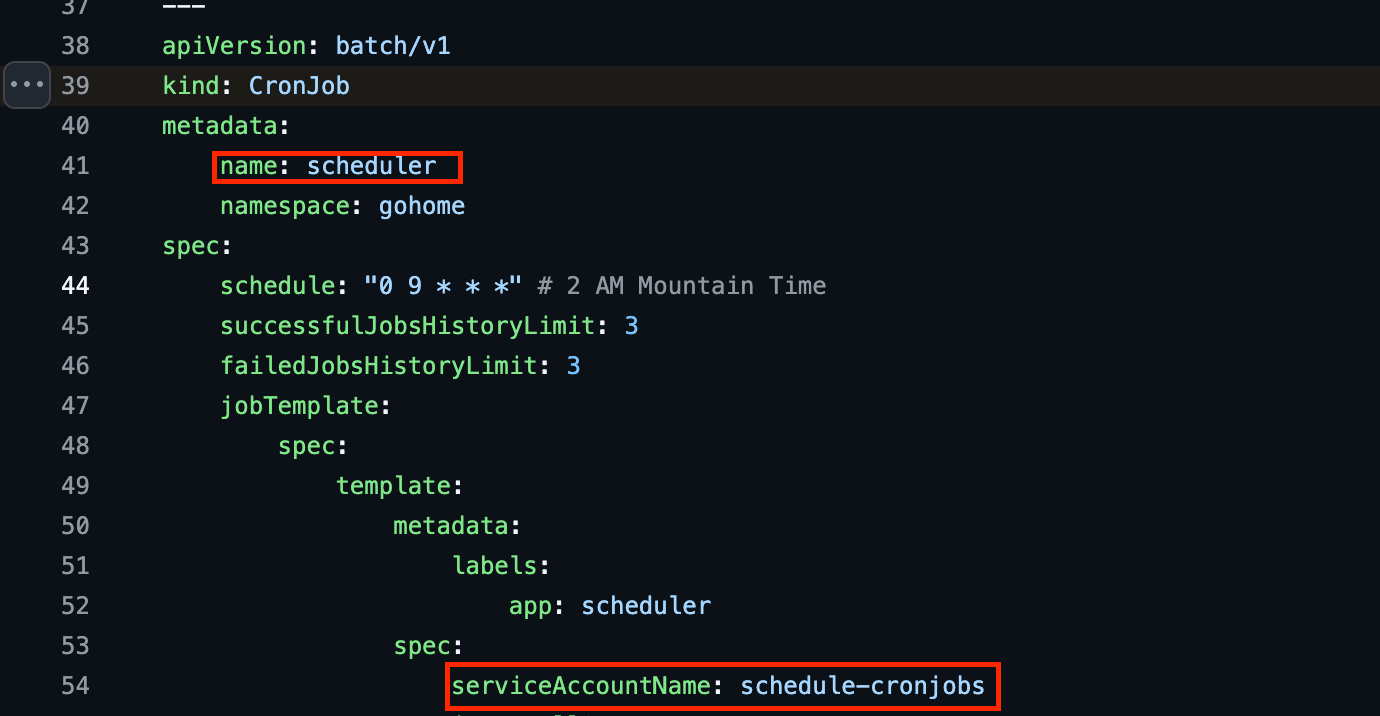
Configuring the Scheduler CronJob to use the service account
But we haven’t assigned any permissions yet. Surely there must be more to do. Service accounts by themselves are merely identities and do not necessarily grant any permissions. To assign permissions, we need to create a Role or ClusterRole and bind it to the service account. What are Roles and ClusterRoles and when might we choose one versus the other?
How Do You Like Your Roles?
The Kubernetes RBAC API declares four kinds of objects: Role, ClusterRole, RoleBinding and ClusterRoleBinding. A Role or ClusterRole contains rules that represent a set of permissions. A Role grants permissions within a particular namespace. ClusterRoles on the other hand, grant permissions across the entire cluster. Depending on which you choose, a RoleBinding or ClusterRoleBinding can then bind the Role to an identity, e.g. a service account.
For our use case so we will assign permissions with a Role to keep them scoped to a single namespace. The YAML snippets for the role is shown below.
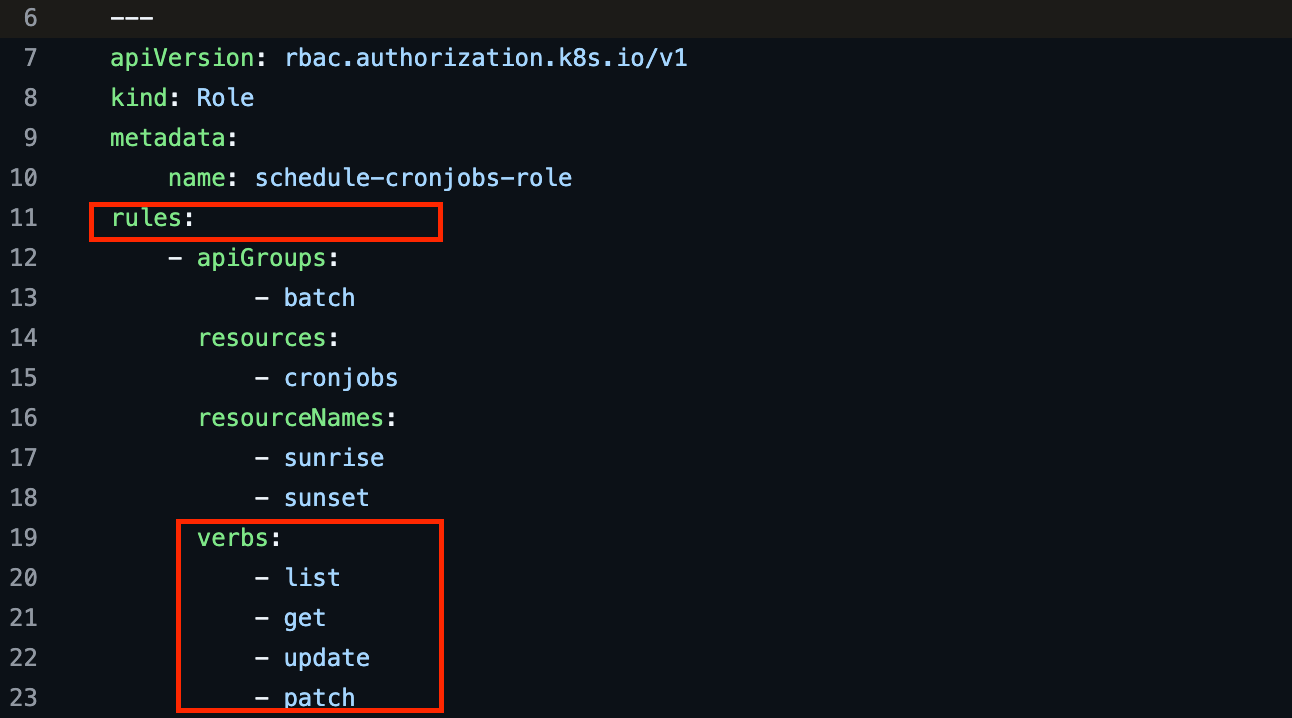
YAML manifest for the role; notice the rules block with apiGroups, resources, and verbs
Notice that the rules block of the Role has references to apiGroups, resources, resourceNames and verbs. You can think of these as a way of defining the where, what, and how of the permissions to be assigned.
Specifically, the rule grants permissions to the batch API (line 12 - 13), hence for CronJobs. The role grants permissions to list, get, update, and patch Cronjobs (lines 19 -23). These permissions are limited to the two specific cronjobs sunrise and sunset using the resourceNames field (line 16-18). Very least privilegy, don’t you think!
Finally, the role is bound to the service account using the RoleBinding shown in the snippet below.
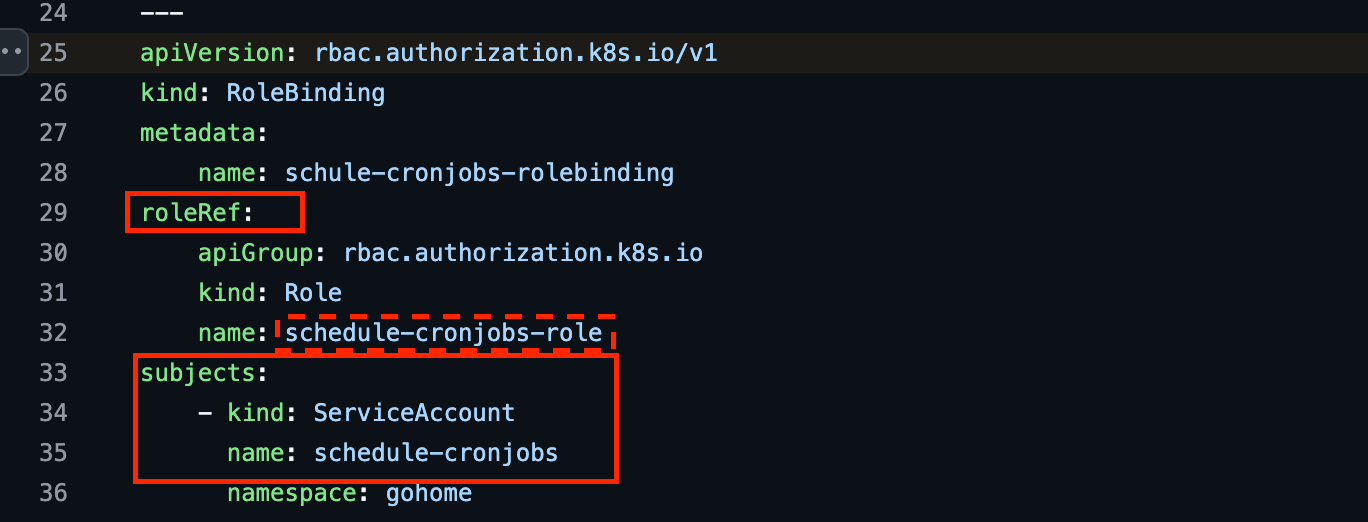
Binding the Role to the Service Account using a RoleBinding
The Doing of Deeds
So far so good. We have configured the scheduler CronJob with the power to modify the execution time of the other two using a service account and an associated role. How does it actually utilize this ability to do the doing? Time to meet the Kubernetes client-go.
The Kubernetes API server is the component of the control plane that acts as the arbiter of all activities within a cluster. To modify the execution time of the other CronJobs, the Scheduler CronJob must request to do so through the API server. The kubernetes client-go is a Go client library for interacting with the Kubernetes API.
The Scheduler Cronjob’s interacts with the cluster, as defined in pkg/scheduler/scheduler.go, using abstractions provided by the client-go library. The Scheduler struct represents an instance of the Scheduler. The struct’s factory function, NewScheduler (line 19), configures each new scheduler instance to use the service account by specifying rest.inClusterConfig (line 21).
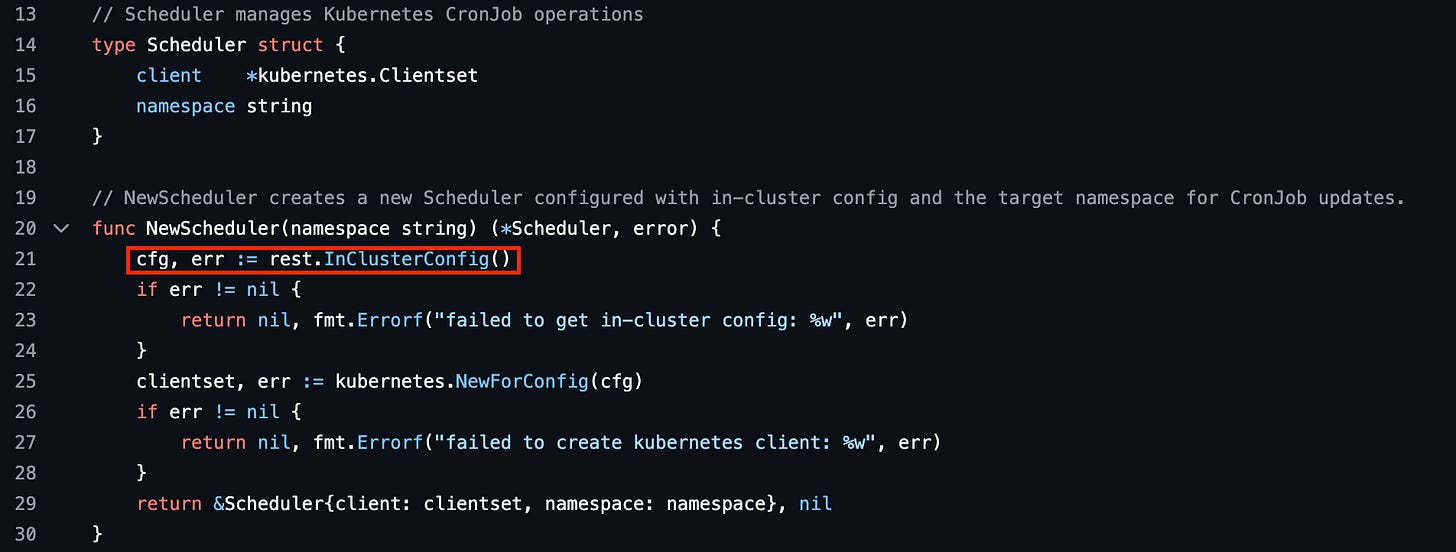
Configuring the Scheduler Go object’s client to use the service account
The ModifyCronJobExecution method on this struct (line 39) is where the actual modification of the execution time is accomplished. This method accepts a cronjob name and a schedule (in cron syntax) and will modify the schedule of the specified CronJob name, provided there is a match (lines 42 - 54).
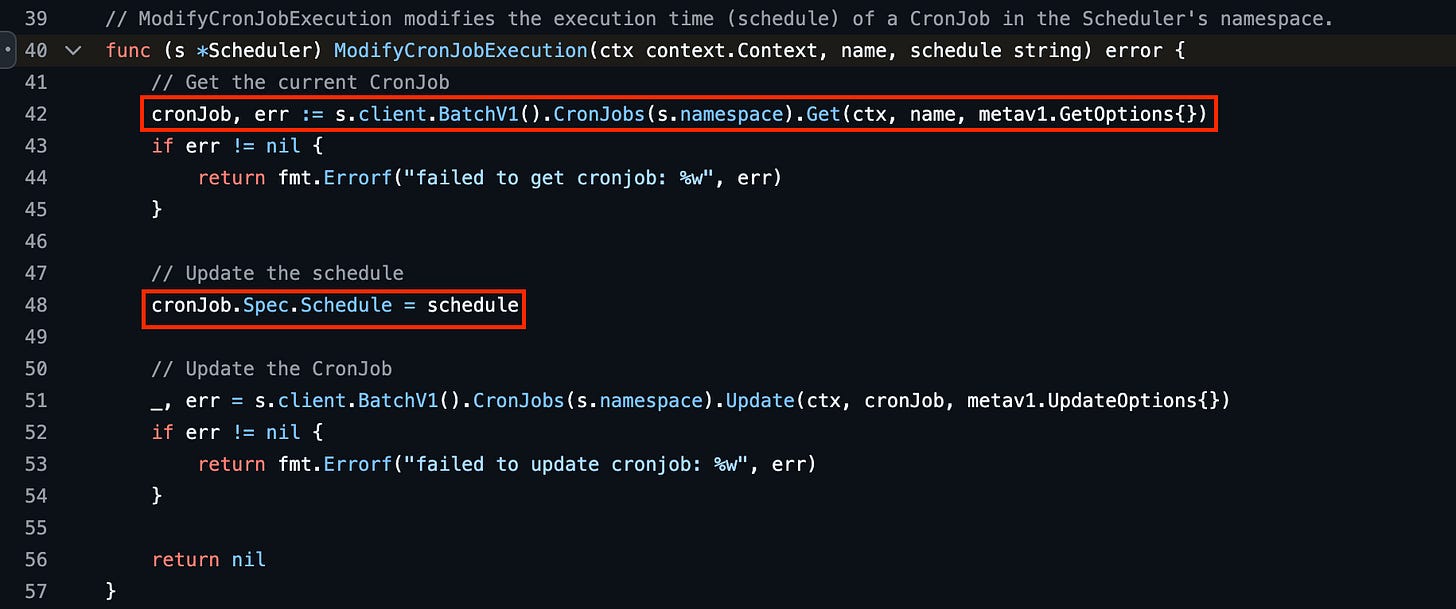
Modifying a CronJob’s execution time using a method on the Scheduler struct
The entrypoint for the scheduler binary is the main function in /cmd/scheduler/main.go. After fetching the forecast sunrise and sunset times from Openweathermap, a helper function UnixToCron converts the forecast to cron syntax (lines 33 - 35). It then instantiates a Scheduler (line 40 - 44), and calls the ModifyCronJobExecution for the Sunrise and Sunset CronJobs, respectively (lines 50 - 60).
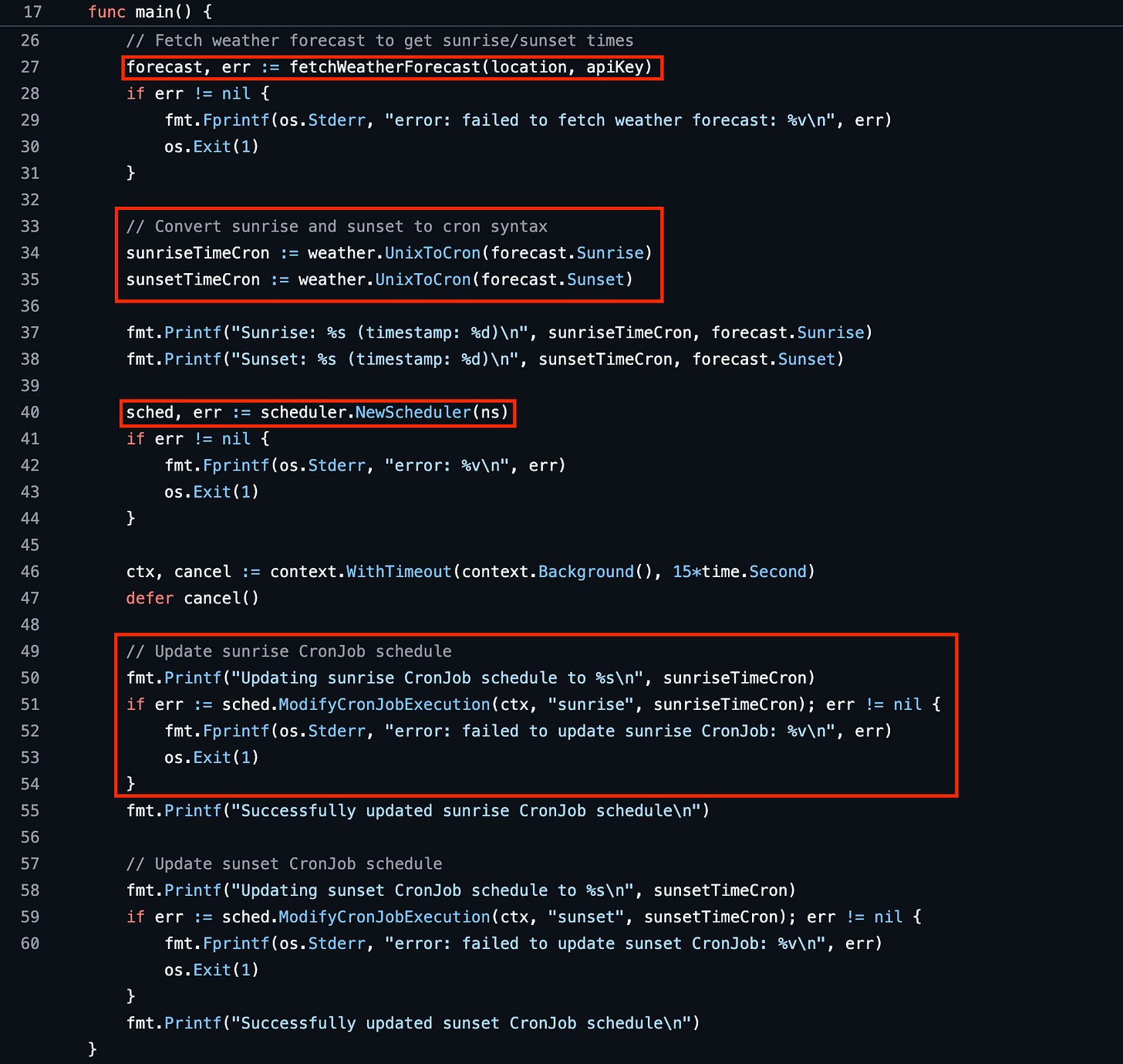
The scheduler binary’s main loop
Confessions and Conclusions
If you have made it this far and you’re still thinking surely there must be an easier way to turn off a Phillips Hue light that all of this convoluted mess of YAML (Oh no!) and Go, I am sorry to tell you that you are probably right. The Phillips Hue App does have the ability to turn lights off on a dynamic sunrise/sunset schedule using built-in automations. That’s the easy thing to do.
Even if you were the kind of person that would prefer to write your own code to automate things, you could probably come up with a simpler architecture that would not involve the operational complexity of Kubernetes. Well, that is if you are not looking for an excuse to learn something about Kubernetes in a fun way like I might have really been here (sorry, I lied). My teacher and mentor John thinks that approaching a problem like this that with a solution that depends on code firing off at precise times does not account for resilience against the fundamental unreliability of cloud infrastructure. What if the nodes running the cluster were restarted, for example. We would then have to wait until the next scheduler execution run. Is that a trade-off we are willing to live with?
In that sense, rather than think of sleep loops, we might instead think in terms of reconciliation loops that continually reconciles the desired state of the lights to the actual state. This way, even if the system failed transiently, things would quickly resolve once it came back online. Kubernetes itself uses this pattern extensively. Surely, that can also be good enough for us.